
This page contains guidelines and information about track making that apply to multiple sections. Other sections may list their own guidelines for that specific topic.
Contents
- Blender
- File Structure
- Scaling
- Polycount Guidelines
- Gameplay
- Style
- About Including Your Track in the Base Game
Blender
Blender is currently used for all detailed and professional-grade tracks in SuperTuxKart. While Blender is very advanced, and actually fairly easy-to-use once you are used to it, it can be daunting for new users and a SuperTuxKart track is not a good place to start for those who have never used Blender.
File Structure
In order for other users to be able to open your Blender file without missing textures, it’s important to have a standardized file structure. Your track’s Blender project file should be in a folder located inside the media repository’s tracks folder. Yes, even if you don’t expect your track to be included in the core game, put your track’s folder inside the media repository as if it already were part of the core game. It’s important in any case because it makes it easier for other artists to figure out where it needs to go so that Blender can find all the right textures.
Scaling
It’s important to know how sizes in Blender translate to STK, especially for the road. (More references can be found on the 3D Model Guidelines page. Here are some references:
- A typical track (for example, Antediluvian Abyss) is about 12 Blender units wide at an average section.
- Certain tracks have very wide sections. For example, the width of the road at the start of Cocoa Temple is ~18 Blender units.
- Tracks like Blackhill Mansion have certain sections (such as the path through the graveyard) that are as narrow as 8 units wide.
Polycount Guidelines
For more details about polycount, as well examples for decorations, see 3D Model Guidelines.
- The polycount for a track should be ~290000 tris. Cocoa Temple exceeds this limit at 295058 tris, but Cocoa Temple is an exceptionally large and complicated track. Your track should not exceed the limit unless ABSOLUTELY’’ necessary. (In this case, “ABSOLUTELY’’ necessary” means that your track is as detailed or more than Cocoa Temple, has the same or better quality, and is not unnecessarily wasting poly.) Most tracks will not even come close to this limit. Antediluvian Abyss, for example, uses 230810 tris, and Gran Paradiso Island uses 235411 tris.
- Use an appropriate balance of high- and low-poly. Partially-covered objects and objects that are always seen from far away should be low poly.
- Avoid unnecessary objects. Objects that cannot be seen or would not be noticed if they were missing should be avoided.
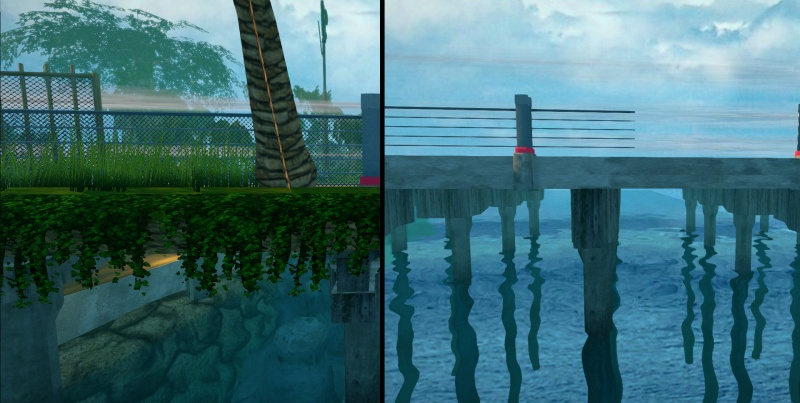
The fence, vegetation, and water are detailed near where karts drive, but far away the fence is very basic, there is no vegetation, and the water has no bottom, only the skybox.
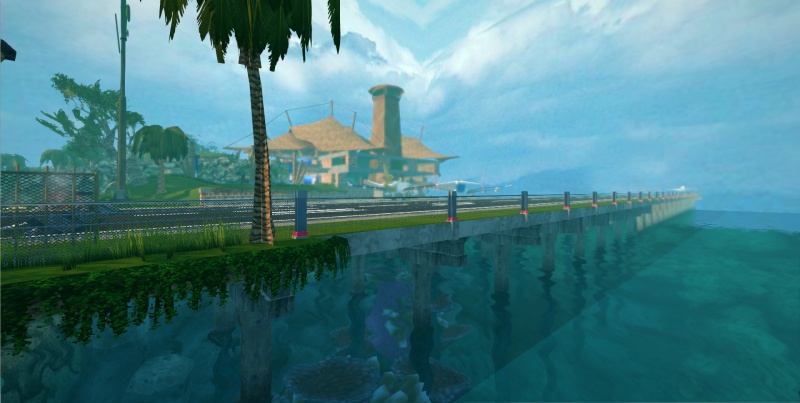
From the player’s point of view, you don’t notice the lack of detail far away.
Gameplay
Gameplay is a crucial aspect to what makes a good track. Beautiful visuals and good theming are enjoyable, but if the driving itself is boring, players will quickly tire of playing your track.
It should be an integral part of your track design process instead of an afterthought.
This guide contains three pages dedicated to gameplay concepts. You should take your time to read them, applying the lessons given there carefully as you craft your track.
- Gameplay fundamentals covers core concepts that should be taken into account for every track. They are crucial to make it enjoyable and give it high replayability.
- Advanced gameplay design covers the concepts that are optional. Nonetheless, for a track to be great, it should likely apply at least some of the ideas presented there.
- Placing items covers adding things such as gift boxes and nitro cans to your track. Changing the location of items takes very little time, so while you may want to use some simple placements early on, it is best to wait until the rest of the gameplay elements are finalized before optimizing item placement.
Style
“What?!” you say? Wasn’t style covered on the Style page? These guidelines are specific to tracks, and thus reduce the noise for other types of artists.
- When creating a track, choose a color palette of just one or two colors to set the theme of the track. Obviously you can use different variations of the colors to add variety, and a red barrel will always be red, regardless of your palette. But to keep the track consistent, you must use the same colors throughout. The main colors in Antediluvian Abyss, for example, are blue and gray.
- Complementing the note about color palettes above, each track’s style should be consistent. Although your track might have multiple sections, the main theme does not change. Cocoa Temple is a good example of this.
- Avoid façades that look awful as soon as a kart leaves the road. Your track should have a beautiful landscape. The new version of STK has a render view of 16km if needed.
About Including Your Track in the Base Game
The visual quality of SuperTuxKart has steadily improved from version to version. We thus have to say that unfortunately we can’t accept everyone’s contributions (but you may put them on the Add-On site). Keeping the visual side improving is important to achieve a high-quality game. Therefore, in general only contributions from people with decent Blender experience will become part of the main game.
If you are new to Blender, you are free (and even welcome) to try learning by making tracks; however it must be said right from the beginning that unless you learn very fast or have natural talent, your (first?) tracks will most likely not become part of the standard set. Note, however, that there is nothing preventing you from releasing your own add-ons on the forums or Add-On site, to share with others.
Gameplay is also a major consideration. For SuperTuxKart Evolution, we put a particular emphasis on making each track not only beautiful but also well-balanced and engaging. If you have already shown your artistic skills and want to make a track for the main game, we strongly advise you to get in touch with the main team through the Forum or other channels and to share early drafts. It is much easier to make adjustments to ensure good gameplay early on.
Be sure to read about Communication. Following the guidelines there will help keep the community a happier and friendlier place.